
Rise of Kingdoms Settings
Configure the in-game side of Rise of Kingdoms so RoKMaster can read and control the game accurately.
5 min read · Updated August 2026
- 1
Language
Set Rise of Kingdoms to English. RoKMaster reads the game interface reliably when it uses the supported language.
- 2
Building Layout
Keep buildings in the default layout. Moving buildings changes where RoKMaster expects them and can break automation.

- 3
Governor Switching
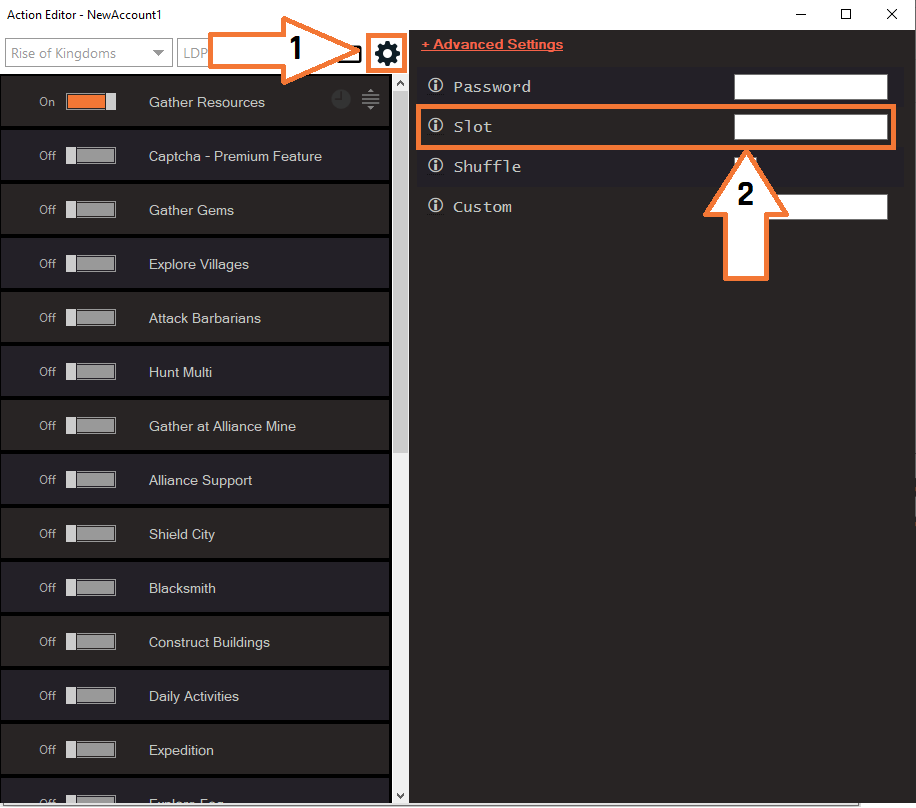
Keep the correct governor active in the city slot. RoKMaster controls whatever governor is currently loaded in the emulator, so set the gear icon and slot correctly in the Action Editor.
- 4
Graphics
Lower the graphics preset and turn off visual effects. Minimal graphics make the game faster and easier for the bot to control.
- Turn off high-quality shadows and particles.
- Disable weather effects if your device supports the option.
- 5
Verify Configuration
Confirm every setting and restart the game once before your first session so all changes are applied.
Was this guide helpful?